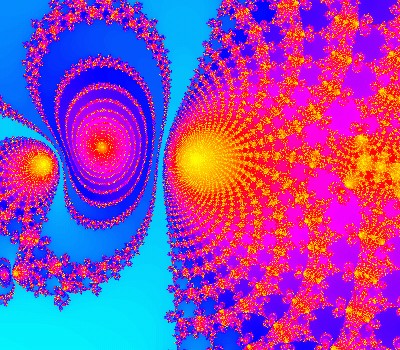
Click above for more standard Mandelbrot images
This site describes the findings in my attempt to visualize a particular 4D object called the Mandelbrot Set. This object is so well known and studied that many people believe it probably doesn't hold any more interesting secrets to be found. This may be true if we restrict ourselves to traditional rendering techniques. I will not go into the details of the traditional technique as you can find many excellent descriptions elsewhere on the web, but as an introduction, you can see several typical images here:
|
Click above for more standard Mandelbrot images |
Clicking the left image above will take you to a page with more typical Mandelbrot images.
You can use the site in the upper right to find and render your own beautiful images.
In these traditional views, you can see that the process simply involves exploring a 2-dimensional image at arbitrarily small scales. It's amazing that this simple object seems to deliver unlimited beautiful images, however there seem to be only a limited number of types of images to be found in it. This may only be true down to the scales and computational power reachable by modern computers. Regardless, many people feel that the straight Mandelbrot formula is mostly tapped out and have gone on to find other formulae that deliver new beautiful forms. I questioned this assumption and have been exploring alternative ways to view this venerated object in new ways.
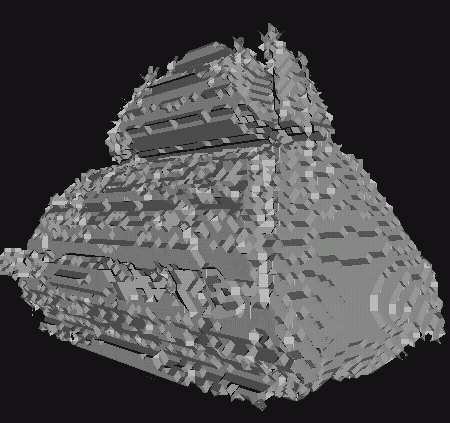
We can start by realizing that the m-set is a 4D object. Each pixel in the standard m-set images are colored by computing the result of an iterative function where two of its four inputs are simply the X and Y coordinates of the pixel, and the other two inputs are simply zero. So how can we see the entire 4D object at once? Perhaps we can't but there are more ways than just examining a single 2D slice. One way is to look at lots of different slices. 2D images rendered the standard way but using a different pair of constant values other than {0,0} are called Julia Set renderings. We can think of them as slices parallel to the original Mandelbrot image plane. Notice that because this is a 4 dimensional formula, there are two dimensions that are parallel to the Mandelbrot image plane. If the m-set were really only just a 3 dimensional object, there would only be one perpendicular direction, and that would make the visualization process much simpler. Well, one thing we can do is to simply ignore one of the perpendicular directions and attempt to visualize the 3D result. This is simply one way of ting 4D to 3D which is equivalent to how 3D objects can be projected into 2D photographs, or how 3D computer models can be displayed on 2D screens. The following image shows a rendering of the "surface" of such a 3D projection of the m-set.
 |
|
| Click image for more 3D presentations of the M-Set |
You can sort of see the rough outline of the familiar Mandelbrot shape above facing to to the right. The standard 2D Mandelbrot slice cuts through the middle of the above rendering and would be black on the inside and various colors outside. The 3D surface above separates all the black regions of dozens of closely spaced slices from their colored regions. In other words, all points inside this volume are inside the m-set and all points outside are not. So 3D objects can be built from stacks of parallel slices. We can also slice the object in other directions as well.
Still, were not really dealing with all 4 dimensions at the same time. Is this a hopeless goal? Not quite. I believe we'll never be able to literally see in 4D with anything close to the same ease that we see in 3D but there are some ways we can project all the 4 dimensional data onto meaningful 2D images and 3D rotations.

|
| Click above to learn about the Buddhabrot technique |
First, let's begin with a new way of viewing the m-set. Clicking the image image above will take you to a page describing a variation on the standard way this object is viewed called the Buddhabrot technique. The important thing to remember here is that Buddhabrot images are not generated from a different fractal formula. They are generated from the standard Mandelbrot formula unchanged. In other words, we are still rendering the same old Mandelbrot object but the Buddhabrot technique just views this familiar fractal object in a new and equally natural way.
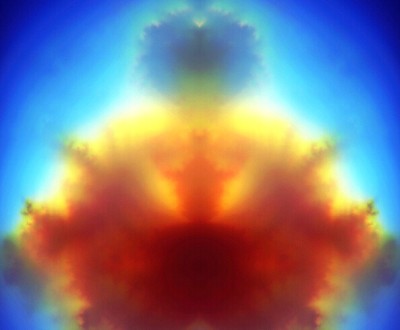
More recently I've realized that a natural extension to the Buddhabrot technique can produce images from the full 4D space. I call images using this extension "Buddhagrams" because their relationship to standard Buddhabrot images is something like the relationship between photographs and holograms. When Buddhagrams are projected onto the standard Mandelbrot plane (i.e. where the 2 extra dimensions are always initialized to 0), the resulting images mostly resemble the first Buddhabrot images. The cool thing about them is that the Buddhagrams retain the full 4D nature of the m-set object and can be projected onto any 2D image planes out of the full 4D space.
 |
|
| Click above to learn about the Buddhagram generalization |
Clicking the image above will take you to a page describing this extension in greater deal and let you view an image gallery showing Buddhagrams projected onto each of the 6 major planes.
Finally, if any buddhagram is projected onto a series of planes rotated slightly from each other, buddhagram animations can be produced much like how rotating holograms are produced. Some of these rotations will look just like rotating 3D clouds but other rotations will appear like clouds turning themselves inside-out. When viewing a 4D rotation that appears to be simply a 3D rotation it's easy think that you've mentally grasped the object and that it is 3 dimensional. This is misleading because there are also other perfectly valid 4D rotations that appear to show a completely different 3D object. So while looking at several of these rotations, it's important to keep reminding yourself that you are always looking at the same object, and that if you could only hold them all in your head at the same time, you would be approaching a correct mental grasp of the real 4D object in its entirety. Below is a small rotating Buddhagram animation. Clicking on it will take you to a page with with several larger animations you can watch along with more detailed explanations.
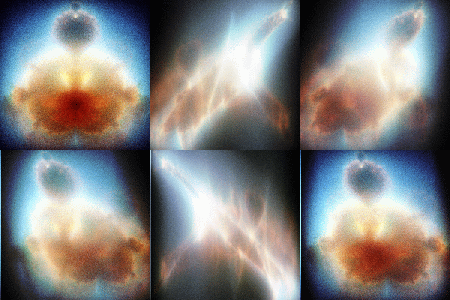
Note to programmers: All the images here use a type of histogram equalization to to assign color indices to raw image data. I've included the C source code for one implementation of my color allocation algorithm here. Note that the actual color ramp used is unimportant. Any alternate color scheme can be substituted later and the fine details will always be preserved. The main thing to notice is that even though only 256 colors are being used, the large smooth areas of the image still show even the subtlest gradations of color.